Sending a Copy of Your ID? Watermark It First
A clean scan of your passport can be reused for anything, by anyone who ends up with it. A copy stamped with who it was for and when cannot. Here is what to write, where to put it, and when an organization will need an unmarked copy.
In this article
Rental applications, job onboarding, car rentals, coworking sign-ups, marketplace verifications: plenty of people ask for a copy of your passport or driver's license, and most of them keep it. It sits in an inbox or a shared drive long after the reason for sending it is over, and every place it's stored is another place it can leak from.
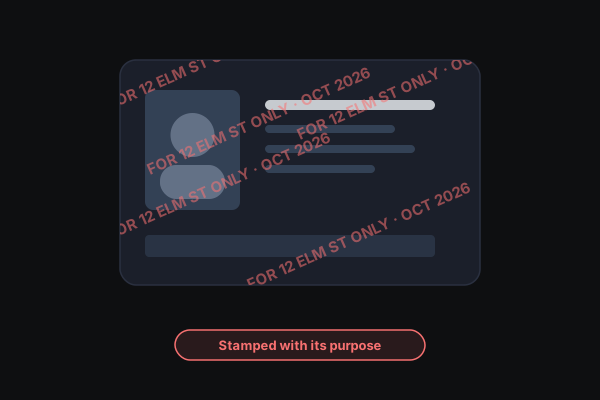
A clean copy of an ID is useful to anyone who wants to pass a verification check in your name. A copy with "For Acme Lettings, 12 Elm St application only · Oct 2026" written across it is far less useful. It visibly belongs to one transaction.
France's government recommends it
France's government runs a free service, Filigrane Facile, for exactly this, and calls adding a watermark to your documents good practice. It works by uploading your files to its servers and deleting them afterwards. Our Watermark an ID tool does the same job without the upload: it runs in your browser, and the file never leaves your device.
What to write
Three things, in plain words:
- Who it's for. The company or person, not just "rental".
- What it's for. "Application for 12 Elm St", "Onboarding", "Account verification".
- When. Month and year is enough.
Example: "For Acme Lettings — 12 Elm St application only — Oct 2026." The more specific it is, the harder the copy is to pass off for something else.
Where to put it
- Across the photo and the key numbers, not tucked in a corner. A watermark that avoids the important parts can simply be cropped out.
- Repeated at an angle across the whole document, so there's no clean strip left to use.
- At around 25–40% opacity, so the details stay readable. The point is to mark the copy, not to make it useless to the person who legitimately needs it.
When you'll need an unmarked copy
Some organizations — banks and government agencies especially — need to read every detail or run the document through automated checks, and they may reject a watermarked copy. If someone asks for a clean copy, it's reasonable to ask why and how they'll store it. For in-person checks, showing the original is better than handing over a copy at all.
Don't forget the hidden details
If you photograph your ID with your phone, the photo probably records where and when you took it. Our watermark tool re-encodes the image from its pixels, which drops that location, time, and phone data. If you just want to clean a photo without stamping it, use the EXIF Data Remover.
Step by step
- Open Watermark an ID and drop in your photo, scan, or PDF.
- Replace the placeholder text with who it's for, what for, and the date.
- Adjust opacity and size until the text crosses the photo and numbers but they're still readable.
- Download the watermarked copy and send that. Keep the original to yourself.
Sending more than an ID — say, an ID plus pay stubs for a rental application? Prepare a Document to Send stamps, redacts, and cleans a document in one pass.