CIDR Notation Explained: How /24 Quietly Becomes 254 Usable Hosts
Subnetting is pure bit arithmetic, which is exactly why it is so easy to get wrong under pressure. Here is what a CIDR prefix actually encodes, the four numbers it determines, and a calculator that shows the binary working instead of just the answer.
In this article
Type 192.168.1.0/24 into a cloud console and it will hand you back a network with 254 usable addresses. Type /23 instead and you double it to 510. Nobody who works with networks regularly does this arithmetic by counting on their fingers — they either have it memorized cold, or they open a calculator, because getting a subnet boundary wrong does not fail loudly. It fails as an overlapping range two teams discover only when their traffic starts colliding.
Our CIDR / Subnet Calculator does the arithmetic instantly and shows the binary underneath it, which is the part worth actually understanding once — because it is genuinely simple bit manipulation, not magic.
What the slash actually says
CIDR — Classless Inter-Domain Routing — notation is an IP address followed by a slash and a number: /24, /16, /30. That number is the prefix length: how many of the address's 32 bits are fixed as the "network" portion. Everything after those fixed bits is free to vary, and that remaining stretch is the "host" portion — the part that actually identifies individual machines inside the network.
A /24 fixes the first 24 bits, leaving 8 bits (one full octet) free — 2⁸ = 256 possible values, which is why every /24 network you have ever seen ends in a range of up to 256 addresses. A /16 fixes only 16 bits, leaving 16 free — 2¹⁶ = 65,536 addresses, an entire class-B-sized block by the old pre-CIDR terminology. The math is always the same shape: 2^(32 − prefix) = total addresses in the block.
The four numbers a prefix determines
Once you fix the prefix, four values fall out of it automatically, and all four are pure bitwise operations against the subnet mask:
- Subnet mask — the prefix expressed as 32 bits, written in dotted-decimal. A /24 is 11111111.11111111.11111111.00000000, or 255.255.255.0.
- Network address — the IP address with every host bit forced to zero. Computed as
ip AND mask. This is the block's identity, never assignable to a device. - Broadcast address — the IP address with every host bit forced to one. Computed as
network OR (NOT mask). Traditionally reserved for reaching every host on the segment at once. - Usable host range — everything between the network and broadcast addresses, exclusive of both. That is why a /24's 256 total addresses become 254 usable hosts: two addresses are spent on bookkeeping before a single device gets one.
Worked example: 192.168.1.0/24
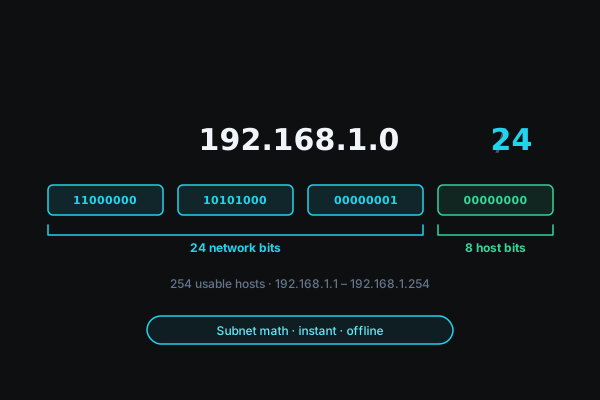
Take the address from the diagram above. 192.168.1.0 in binary is 11000000.10101000.00000001.00000000 — split at the /24 boundary, the first three octets (24 bits) are the network portion, and the last octet (8 bits) is entirely host space.
- Network address: 192.168.1.0 (the address you started with, since the host bits were already zero)
- Broadcast address: 192.168.1.255 (every host bit flipped to one)
- Usable range: 192.168.1.1 through 192.168.1.254
- Usable hosts: 254
Change nothing but the prefix to /25, and every one of those numbers shifts: the block splits into two subnets of 128 addresses each (126 usable), because you have moved the boundary one bit deeper into what used to be host space. This is the entire game of subnetting — deciding where to draw that boundary, and living with the host-count consequences on either side of it.
The wildcard mask
Cisco access control lists and OSPF configuration do not match on the subnet mask directly — they match on its wildcard mask, the bitwise inverse. For a /24 (255.255.255.0), the wildcard mask is 0.0.0.255. Where the subnet mask says "these bits must match," the wildcard mask says "these bits are allowed to vary" — the same boundary, described from the opposite direction, and network engineers end up needing both forms of the same fact depending on which vendor's syntax they are writing.
A quick-reference table
| Prefix | Subnet mask | Total addresses | Usable hosts |
|---|---|---|---|
| /30 | 255.255.255.252 | 4 | 2 |
| /29 | 255.255.255.248 | 8 | 6 |
| /28 | 255.255.255.240 | 16 | 14 |
| /27 | 255.255.255.224 | 32 | 30 |
| /26 | 255.255.255.192 | 64 | 62 |
| /25 | 255.255.255.128 | 128 | 126 |
| /24 | 255.255.255.0 | 256 | 254 |
| /23 | 255.255.254.0 | 512 | 510 |
| /16 | 255.255.0.0 | 65,536 | 65,534 |
Two edge cases the "minus 2" rule doesn't cover
/31 — point-to-point links. RFC 3021 carves out an exception specifically for /31 blocks: with only 2 total addresses and no room to spare a network and broadcast address separately, both addresses are usable. This exists almost entirely for router-to-router WAN links, where "wasting" two of your four addresses on overhead you will never need is a real cost at scale.
/32 — a single host route. No network/broadcast split applies at all; a /32 identifies exactly one address, commonly used for loopback interfaces and highly specific routing table entries.
Which private range should I even use?
RFC 1918 reserves three blocks for internal networks that never need to route on the public internet: 10.0.0.0/8 (16.7 million addresses — the standard choice for cloud VPCs with room to grow), 172.16.0.0/12, and 192.168.0.0/16 (the one home routers default to). All three are built into our calculator as one-click presets, alongside a couple of common real-world sizes like a /28 for a small office subnet.
Pro tipIf you are sizing a VPC from scratch, err large. Reclaiming address space from a subnet that turned out too small means renumbering live infrastructure; starting with a /16 when you only need a /22 today costs nothing and buys years of headroom.
Checking your own blocks
Paste any CIDR block into the calculator and every value above — network, broadcast, usable range, both masks, and the raw binary split — appears instantly, entirely client-side. Nothing about the address you are debugging leaves your browser, which matters more than it sounds: the network you are troubleshooting is sometimes the very network you would be sending that address information over.